Introduction
Network Notepad CDP Neighbor Tool is an add-on auto-discovery utlility that works with
products which support CDP
(Cisco Discovery Protocol). Right click an object in your diagram and select
"Discover Neighbors", and it will use SNMP to gather information from the
device's CDP table, what is connected to the object and the interface names it
connects with. Click the paste button in Network Notepad to add the discovered
objects to your diagram.
Installation
Install Network Notepad CDP Tool in to the same folder where you installed Network Notepad
or Network Notepad Professional Edition.
The program adds a new function button to Network Notepad - "Discover Neighbors".
For Network Notepad Professional Edition it is necessary to define a
function button yourself. Here is an example entry from the tooldefs.txt
file:
Command(0,9)="C:\Program Files (x86)\Network
Notepad Professional\NetpadCDP.exe" $ipaddress $field2
Display(0,9)=Discover Neighbors
AutoMin(0,9)=False
Download here.
Operation
In Network Notepad, right click an object that supports CDP and select
"Discover Neighbors".
The CDP Tool window will appear:
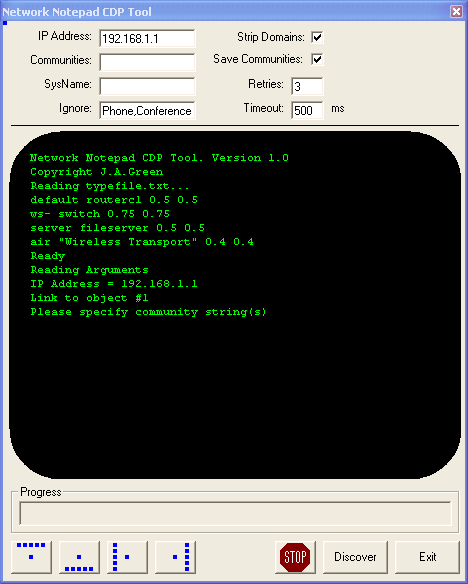
|
IP Address:
IP address of unit to perform discovery on. If you right-clicked an object
in Network Notepad this will be filled in automatically.Communities:
Specify a list of SNMP community strings to try. Enter multiple communities
separated by commas eg. "public,private,abcdef".
Sysname:
Leave blank. If the SNMP community string is successful the program will
fill this in.
Ignore:
The program will ignore any devices discovered which contain any of these
words in the description.
Strip domains:
The names of devices are often retrieved with the domain name tagged on eg.
myrouter.mycorp.com
This option will return just the "myrouter" part.
Save Communities:
This option stores the SNMP communities in the registry.
Retries: and Timeout:
Specifies the number of retries and the timeout for SNMP requests.
|
The first time you run the program, enter the
SNMP community strings and click the Discover button.
The program will then retrieve the CDP table from the unit.
When complete, click one of the four blue position buttons to select the
layout of the objects discovered.
The CDP Tool window now closes.
In Network Notepad, click the paste button and paste the discovered objects.
Typefile.txt File
The typefile.txt file is located in the application folder and is used to
translate the discovered device strings to objects in Network Notepad:
# This file is used to set the icon for
discovered objects.
# Fields are:
# string to search for
# object type
# icon size x scale factor
# icon size y scale factor
#
default routerc1 0.5 0.5
ws- switch 0.75 0.75
server fileserver 0.5 0.5
air "Wireless Transport" 0.4 0.4
Caveats
CDP Tool doesn't currently recognise existing
links which are already in the diagram.
CDP Tool doesn't currently recognise multiple links between two objects.
Workaround for CDP Tool Not Recognising Multiple Links Between
Objects
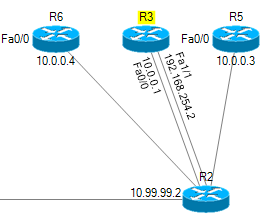
In the example below, after running the CDP Tool on R2 and
pasting the result, multiple links to R3 have been discovered:
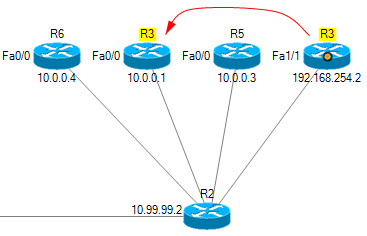
Workaround Steps:
-
Click on one of the R3 links so that
the link termination is highlighted (red/orange circle).
-
Drag the link termination from that
R3 to the other R3. Network Notepad will recognised you have
moved the link from one object to another.
-
Reposition both links to the one R3
router so they run parallel.
-
Ungroup the interface name and
address labels from the redundant R3 and reposition next to
the other R3.
-
Delete the redundant R3.